Claude Code usage,
piped into Home Assistant →
ccusage-mqtt watches Claude Code's local session files and the Anthropic rate-limit headers, then publishes 15 sensors to MQTT — auto-discovered into a single Home Assistant device with a pre-built Lovelace dashboard. No API key. Pro/Max + Enterprise.
Four things that make it click.
Designed to slot into a homelab in under five minutes and disappear into your dashboard from there.
Mood at a glance
Burn-rate sensor classifies your session into idle / normal / active / heavy — same thresholds as Clawdmeter.
15 sensors out of the box
5h + 7d utilization, burn rate, mood, time-to-limit, tokens, spend. Auto-discovered into one HA device.
No API key
Reads the OAuth token Claude Code already stored at ~/.claude/.credentials.json. Zero extra setup.
Lovelace dashboard included
Drop the included YAML into Home Assistant's Raw configuration editor and the sensors light up a card with mood, gauges, burn rate, and tokens — instantly.
15 sensors, three sources, one device.
MQTT topics use the sensor IDs below (e.g. claude_code_usage/session_pct/state). HA derives entity IDs from the friendly name, so session_pct becomes sensor.claude_code_usage_session. The included YAML uses those entity IDs directly.
// anthropic api
06 · 60s refreshFrom the anthropic-ratelimit-unified-* response headers on every probe. Pro/Max returns 5h-* + 7d-*; Enterprise returns overage-* instead — the parser handles both schemas transparently.
// ccusage cli
02 · 30s refreshLocal Claude Code session JSONLs parsed by ccusage.
// metadata
01// derived locally
06 · computedComputed from the inputs above on every publish cycle.
Mood thresholds (Pro/Max)
Borrowed verbatim from the Clawdmeter firmware so the two agree if you run both. Burn rate is %-of-window per minute. Enterprise plans don't expose 5h/7d utilization, so mood falls back to tokens/hour thresholds — default boundaries 500 · 2 500 · 10 000.
Up in five lines.
Needs Python 3.12+ and Node.js — the publisher shells out to the ccusage CLI. Then it's just systemd.
Then run it on boot
Drop into a systemd user unit — there's a template in the README. For Home Assistant, grab the ready-to-paste Lovelace YAML on the dashboard page.
- Add the unit. Copy
ccusage-mqtt.servicefrom the README to~/.config/systemd/user/. - Enable + start.
systemctl --user enable --now ccusage-mqtt. - Paste the YAML. Open HA → Raw configuration editor → drop in the snippet from the dashboard section below.
- Done. Sensors auto-discover within seconds and the dashboard fills in.
A drop-in Home Assistant dashboard.
Mood at a glance, current 5h / 7d gauges, burn rate, time-to-limit, tokens used + spend — all auto-wired the moment HA discovers the device.
- Mood + gauges up top — current state, 5h utilization, 7d utilization (Pro/Max), all visible at a glance.
- Burn-rate timeline — 24h history graph so you can see your hot hours.
- Pixel-art Clawd — picture-entity card keyed on the mood sensor, sprites from claudepix.
- Matches Clawdmeter's data shape — if you also run the ESP32 desk dashboard, the two are interchangeable.
- Yaml below — paste it into
Settings → Dashboards → ⋮ → Raw configuration editorand you're done.
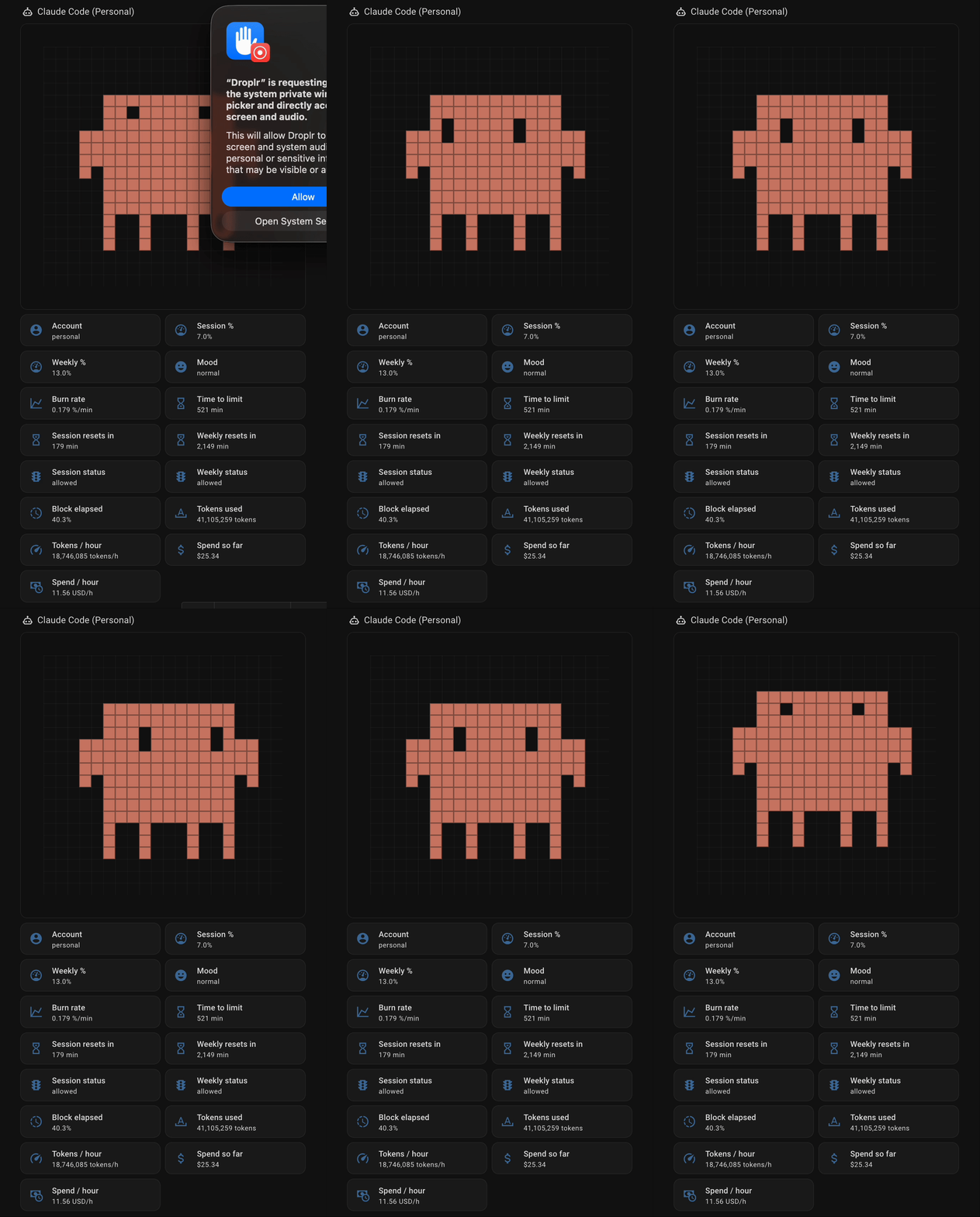
title: CCusage
views:
  - title: Usage
    path: usage
    type: sections
    max_columns: 1
    sections:
      - type: grid
        cards:
          - type: heading
            heading: Claude Code Usage
            heading_style: title
            icon: mdi:robot-outline
          - type: conditional
            conditions:
              - condition: state
                entity: sensor.claude_code_usage_mood
                state: idle
            card:
              type: iframe
              url: >-
                https://claudepix.vercel.app/animations/idle_breathe.html?speed=1
              aspect_ratio: 100%
              grid_options:
                columns: 12
                rows: 4
          - type: conditional
            conditions:
              - condition: state
                entity: sensor.claude_code_usage_mood
                state: normal
            card:
              type: iframe
              url: >-
                https://claudepix.vercel.app/animations/idle_look_around.html?speed=1
              aspect_ratio: 100%
              grid_options:
                columns: 12
                rows: 4
          - type: conditional
            conditions:
              - condition: state
                entity: sensor.claude_code_usage_mood
                state: active
            card:
              type: iframe
              url: https://claudepix.vercel.app/animations/work_coding.html?speed=1
              aspect_ratio: 100%
              grid_options:
                columns: 12
                rows: 4
          - type: conditional
            conditions:
              - condition: state
                entity: sensor.claude_code_usage_mood
                state: heavy
            card:
              type: iframe
              url: https://claudepix.vercel.app/animations/work_think.html?speed=1
              aspect_ratio: 100%
              grid_options:
                columns: 12
                rows: 4
          - type: tile
            entity: sensor.claude_code_usage_session
            name: Session %
          - type: tile
            entity: sensor.claude_code_usage_weekly
            name: Weekly %
          - type: tile
            entity: sensor.claude_code_usage_mood
            name: Mood
          - type: tile
            entity: sensor.claude_code_usage_burn_rate
            name: Burn rate
          - type: tile
            entity: sensor.claude_code_usage_time_to_limit
            name: Time to limit
          - type: tile
            entity: sensor.claude_code_usage_session_resets_in
            name: Session resets in
          - type: tile
            entity: sensor.claude_code_usage_weekly_resets_in
            name: Weekly resets in
          - type: tile
            entity: sensor.claude_code_usage_session_status
            name: Session status
          - type: tile
            entity: sensor.claude_code_usage_weekly_status
            name: Weekly status
          - type: tile
            entity: sensor.claude_code_usage_block_elapsed
            name: Block elapsed
          - type: tile
            entity: sensor.claude_code_usage_tokens_used
            name: Tokens used
          - type: tile
            entity: sensor.claude_code_usage_tokens_per_hour
            name: Tokens / hour
          - type: tile
            entity: sensor.claude_code_usage_spend_so_far
            name: Spend so far
          - type: tile
            entity: sensor.claude_code_usage_spend_per_hour
            name: Spend / hour